PDF Ready

CEAC

CEAC with a conservative 2 MB path

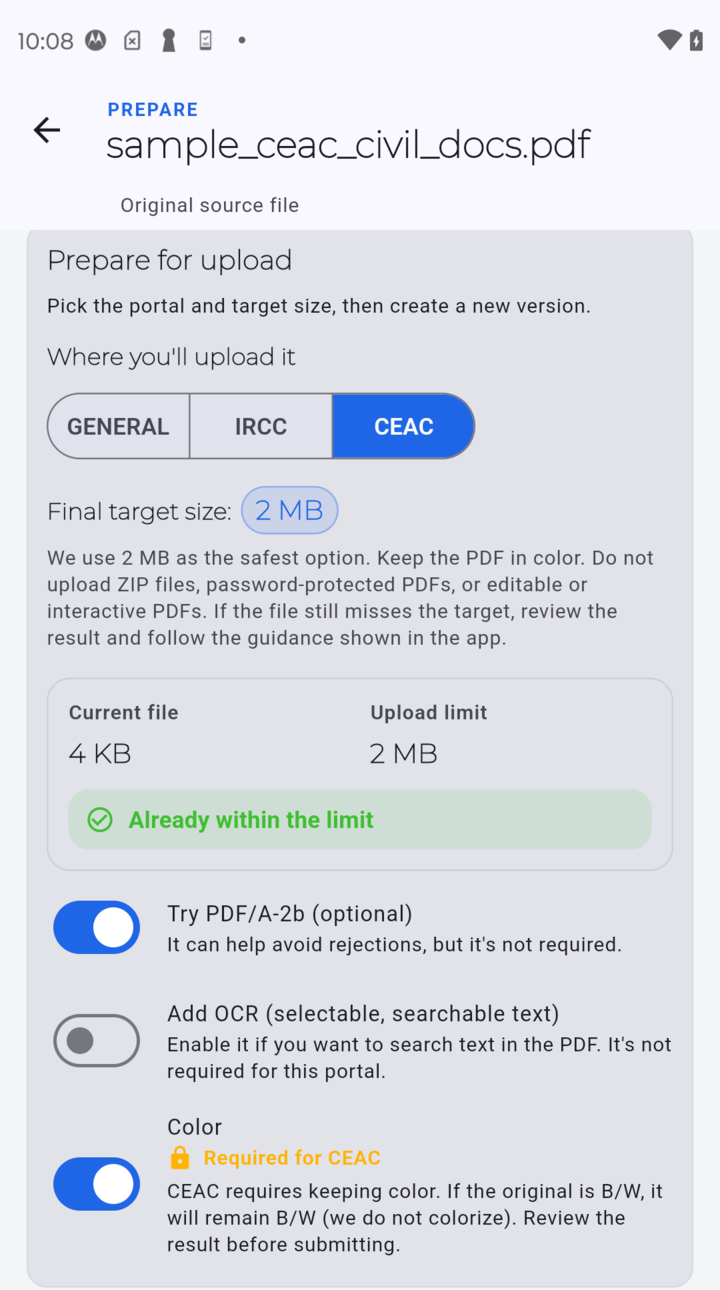
Start with 2 MB and keep the PDF simple and compatibility-first before upload.

PDF Ready CEAC screen showing the conservative 2 MB target and compatibility-related options without cropped labels near the final action
Start with the conservative 2 MB path and keep the file simple.

CEAC choices

Start conservatively for CEAC

CEAC works best when you start with a simple, compatibility-first PDF and the conservative 2 MB target.

  • Start from 2 MB when the upload path is CEAC-related.
  • Keep color only when the document really needs it.
  • Treat OCR or PDF/A as contextual extras, not the main promise.

Compatibility first

Keep the file simple and compatibility-first

CEAC is more reliable when you start with a simple PDF and the conservative target before trying anything more aggressive.

Avoid problem files

Keep protected or interactive files out of the default path

Avoid password-protected, encrypted, or interactive files until they are simplified enough for the real upload step.

Split last

Use split only as a last resort

Split only when the real upload path clearly accepts multiple files.

Review result

Review before you treat the file as ready

Prepare helps you review a prepared result before clean export. It is not a guarantee that CEAC will accept the file.

  • Check the result first.
  • Keep the file simple and close to the real checklist.
  • Final acceptance still depends on the destination.
PDF Ready preview screen showing a prepared result within the limit before final clean export
Review the prepared result before clean export.

Ready to try it?

Get PDF Ready on Google Play.

Get PDF Ready on Google Play

Disclaimer: PDF Ready is not affiliated with any government authority.

Disclaimer: PDF Ready does not guarantee final acceptance. Portal rules can still reject a file.