PDF Ready

Guide

Choose the right target size

Start here when the real problem is size. PDF Ready already gives you exact sizes from under 1 MB up to 12 MB, so the safest choice depends on the real limit you have, not on guesswork.

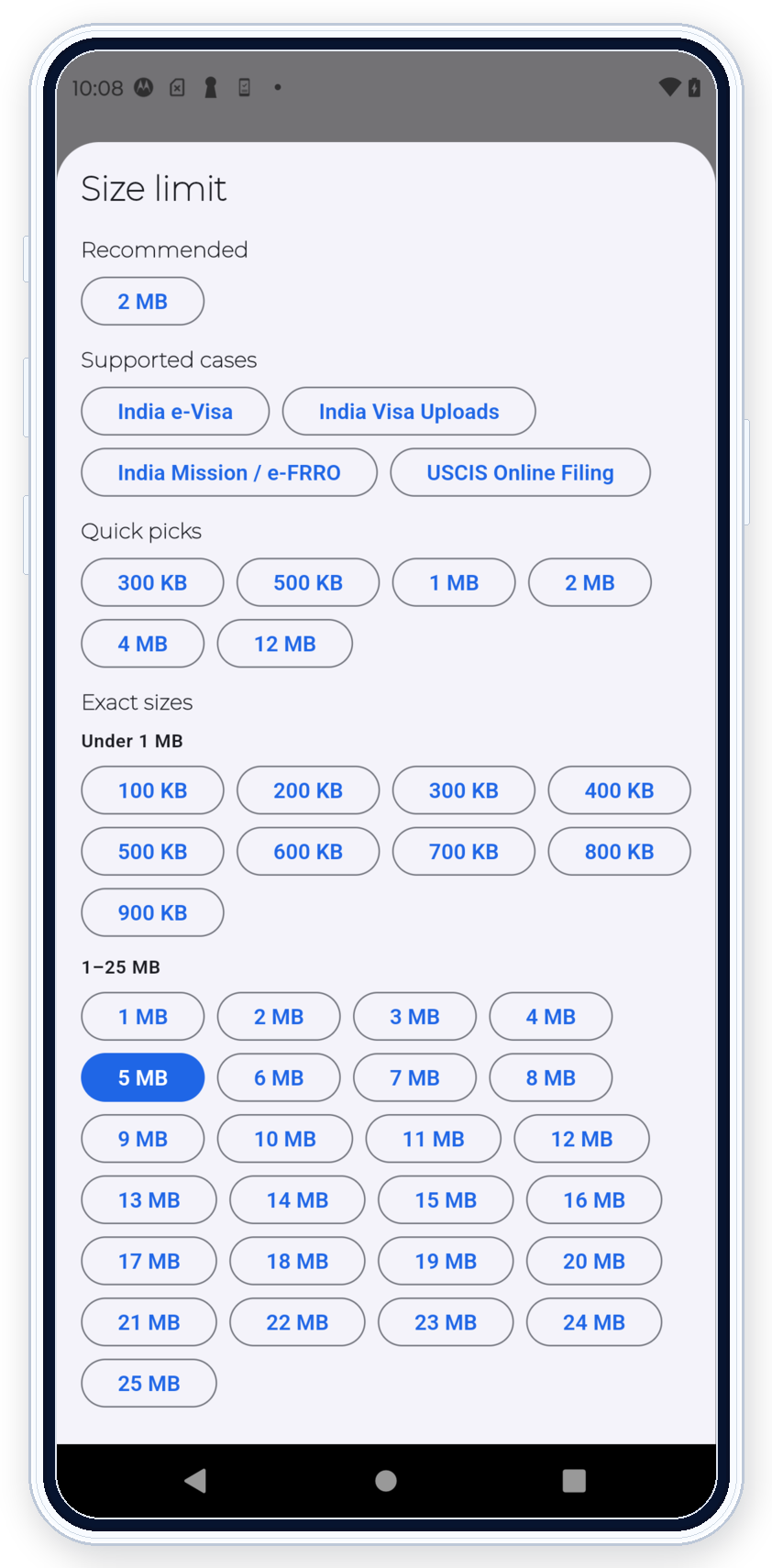
300 KB 500 KB 1 MB 2 MB 4 MB 12 MB
Quick view

Start from the limit the upload really asks for

PDF Ready already exposes the most common strict size targets in one place. That makes it easier to start from the real limit instead of guessing and over-compressing too early.

  • Use 300 KB, 500 KB, or 1 MB for tighter uploads.
  • Use 2 MB or 4 MB when the destination clearly allows those limits.
  • Keep 12 MB under GENERAL when the real job is still exact size.
PDF Ready exact-size selector on Android showing the quick picks and the full Exact sizes list without cropped labels
Choose the exact size the upload asks for.

Exact size first

Pick the real limit instead of a generic guess

PDF Ready already exposes exact sizes below 1 MB in 100 KB steps, plus the quick picks that matter most in public upload work.

  • 300 KB and 500 KB help when the portal is very strict.
  • 1 MB is the cautious middle point when you still need readability.
  • 2 MB, 4 MB, and 12 MB are still exact-size choices, not random defaults.

Portal or size

Switch to a portal only when you already know the destination

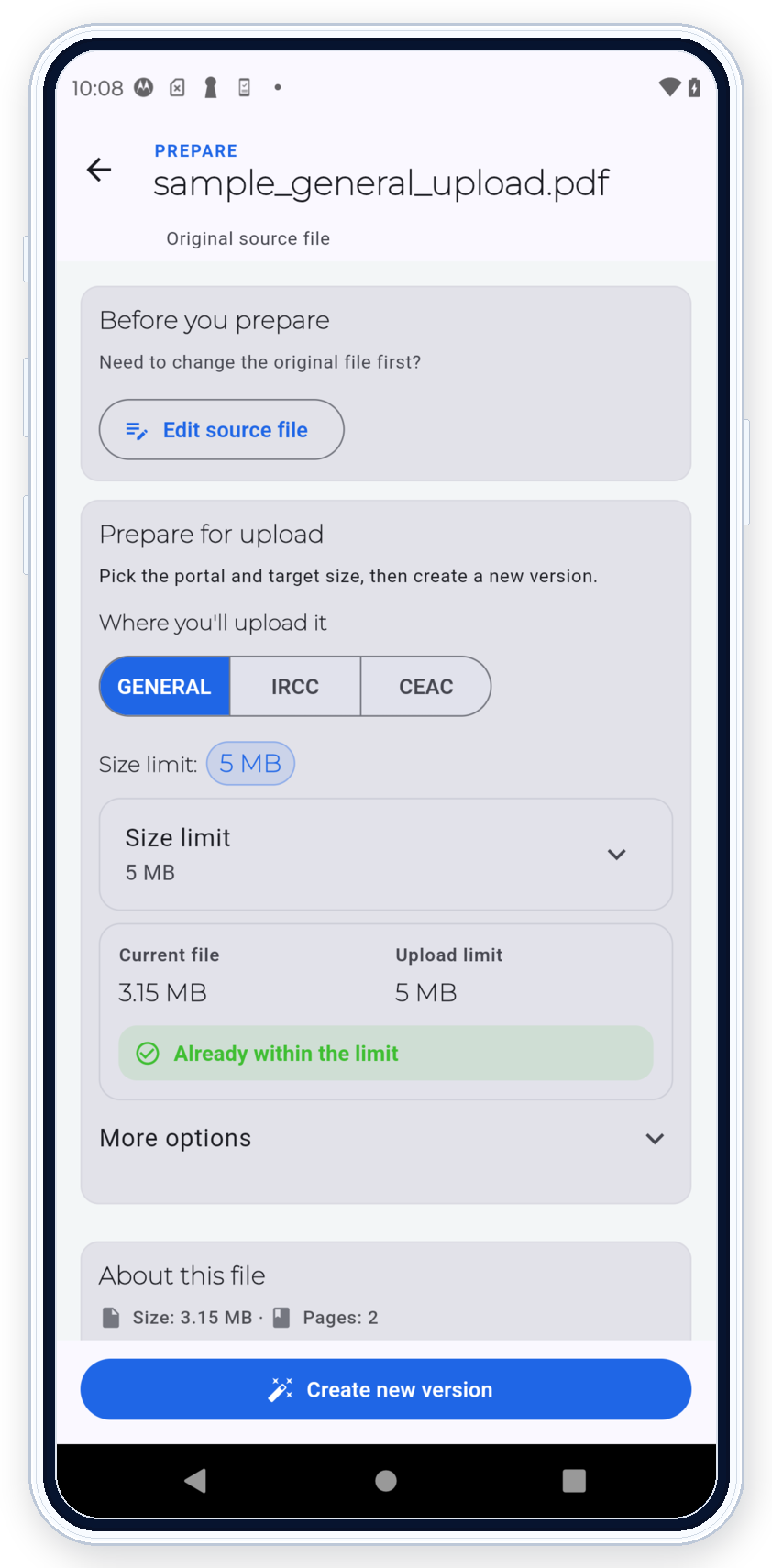
GENERAL is for size-first work. IRCC and CEAC are portal-aware branches for situations where the upload path is already known and needs a different explanation.

  • GENERAL: use it when you only know the size limit.
  • IRCC: use it for the 2 MB, 3 MB, and 4 MB IRCC framing.
  • CEAC: use it for the conservative 2 MB compatibility-first path.
PDF Ready prepare screen showing GENERAL, IRCC, and CEAC on the same screen before creating a new version
Choose the portal only when you already know the destination.
PDF Ready preview screen showing a generated result within the limit before final clean export
Review the result before the final clean export.

Review

Prepare first and review before you pay

Once you choose the target, PDF Ready prepares the new version and lets you review the outcome before the final clean export. That is where you confirm size, warnings, and readability.

  • Use 2 MB when the real path is stricter.
  • Use 4 MB only when the destination clearly allows it.
  • Keep 12 MB under GENERAL when the destination simply allows a larger file.

When to use 2 MB

Use it when the real upload path is strict

CEAC usually starts here. IRCC should also start here when you do not know the exact upload path yet.

When to use 4 MB

Use it only when the path really allows more

4 MB is not a public default. It is a larger allowed size for cases that truly support it.

When to use 12 MB

Keep broader exact-size work under GENERAL

12 MB is still part of the exact-size story. It belongs under GENERAL, not under the stricter IRCC or CEAC public framing.

Disclaimer: Not affiliated with any government authority.

Disclaimer: PDF Ready does not guarantee final acceptance. Portal rules can still reject a file.